* [lttng-dev] How to use the lttng-untrack command
@ 2020-09-01  9:13 熊毓华
  2020-09-01 13:37 ` Mathieu Desnoyers
  0 siblings, 1 reply; 4+ messages in thread
From: 熊毓华 @ 2020-09-01  9:13 UTC (permalink / raw)


Hi?dear


Hello, I have encountered some problems in using LTTNG, which is briefly described as follows. I am eager to get your help.


About the use of the untrack command.It is reproduced as follows:

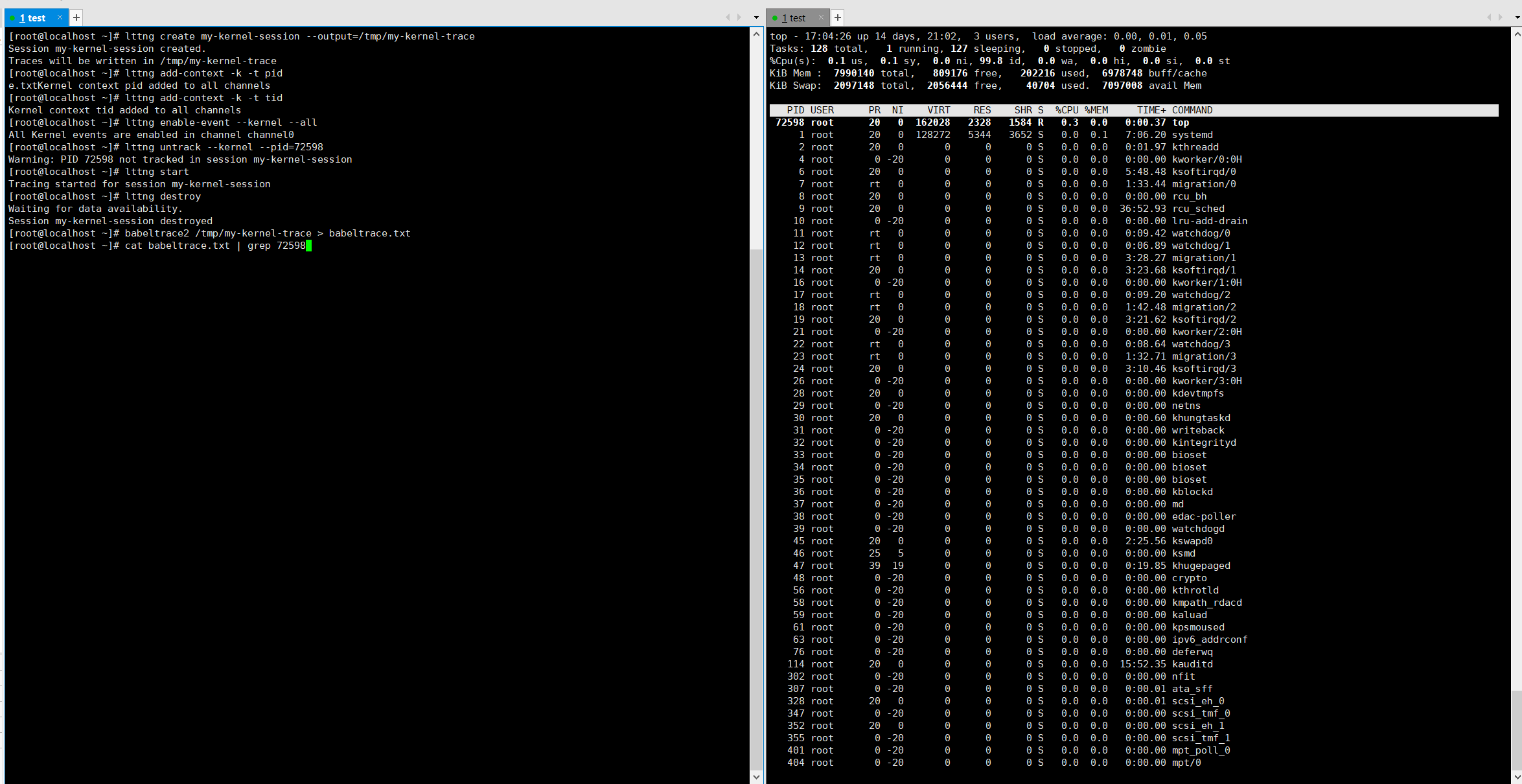
I type the following commands in turn to start LTTNG, and set up not to monitor a particular process.(For example, I input the "top" command in the terminal, the PID of the "top" process is 72598, now I want LTTNG not to monitor the "top" process)


lttng create my-kernel-session --output=/tmp/my-kernel-trace
lttng add-context -k -t pid
lttng add-context -k -t tid
lttng enable-event --kernel --all
lttng untrack --kernel --pid=72598
lttng start
lttng destroy
babeltrace2 /tmp/my-kernel-trace > babeltrace.txt


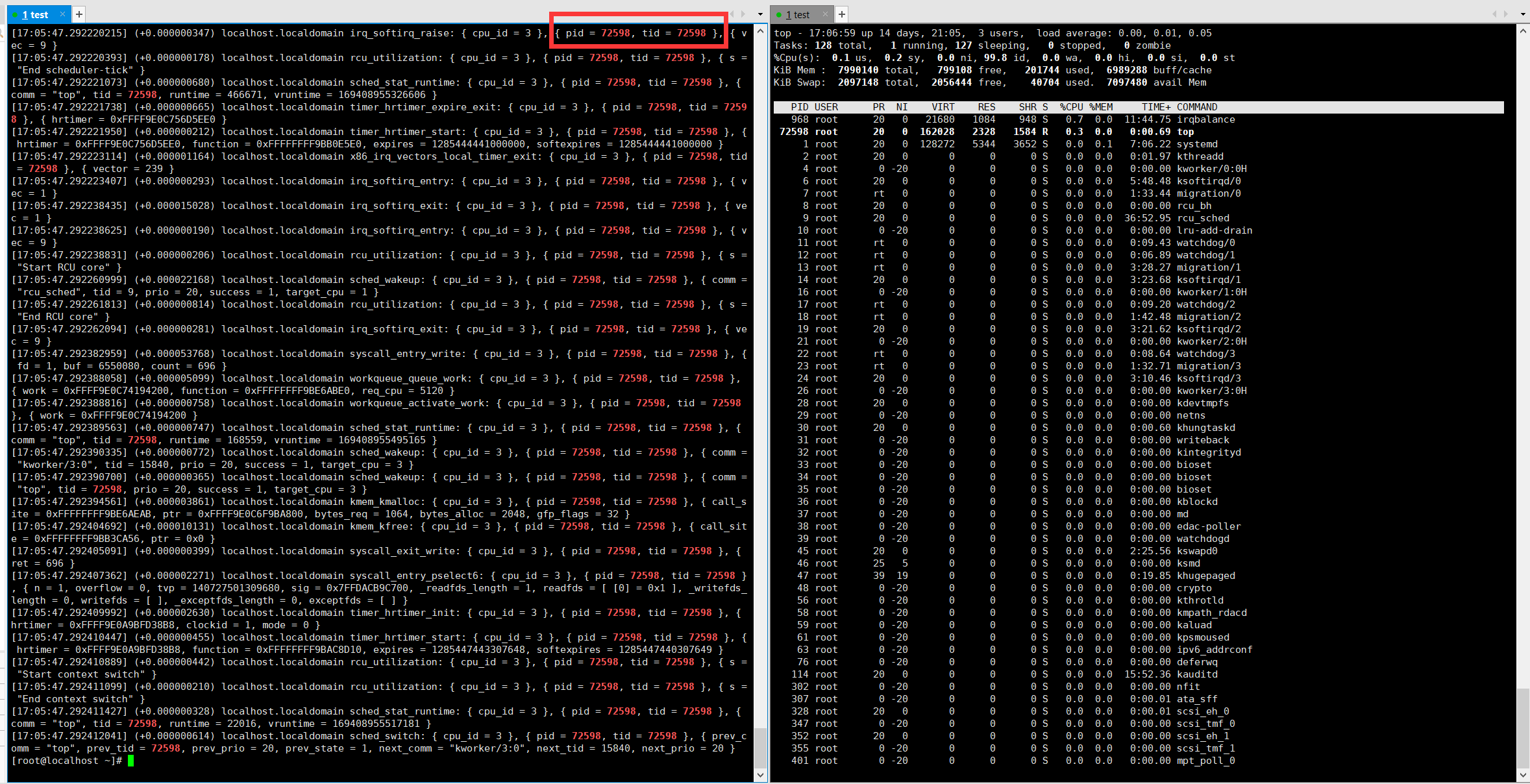
Unfortunately, the output still contains the data for PID72598.
Even after I changed "lttng untrack --kernel -- PID =72598" to "LTTNG untrack-u -- PID =72598", this phenomenon still occurred.

How do I use the lttng-untrack command to achieve my goal?


Looking forward to your reply.
thanks,
yuhua

------------------
Yuhua Xiong
Lab for Internet and Security Technology
School of Computer Science and Technology
Zhejiang University
Hangzhou, 310007, P.R. China

-------------- next part --------------
An HTML attachment was scrubbed...
URL: <https://lists.lttng.org/pipermail/lttng-dev/attachments/20200901/9564c028/attachment-0001.htm>
-------------- next part --------------
A non-text attachment was scrubbed...
Name: 1598951079297.png
Type: image/png
Size: 228995 bytes
Desc: not available
URL: <https://lists.lttng.org/pipermail/lttng-dev/attachments/20200901/9564c028/attachment-0002.png>
-------------- next part --------------
A non-text attachment was scrubbed...
Name: 1598951286057.png
Type: image/png
Size: 382880 bytes
Desc: not available
URL: <https://lists.lttng.org/pipermail/lttng-dev/attachments/20200901/9564c028/attachment-0003.png>


^ permalink raw reply	[flat|nested] 4+ messages in thread
* [lttng-dev] How to use the lttng-untrack command
  2020-09-01  9:13 [lttng-dev] How to use the lttng-untrack command 熊毓华
@ 2020-09-01 13:37 ` Mathieu Desnoyers
  2020-09-03  2:53   ` 熊毓华
  0 siblings, 1 reply; 4+ messages in thread
From: Mathieu Desnoyers @ 2020-09-01 13:37 UTC (permalink / raw)


----- On Sep 1, 2020, at 5:13 AM, ??? <xiongyuhua at zju.edu.cn> wrote:

> Hi?dear

> Hello, I have encountered some problems in using LTTNG, which is briefly
> described as follows. I am eager to get your help.

> About the use of the untrack command.It is reproduced as follows:

> I type the following commands in turn to start LTTNG, and set up not to monitor
> a particular process.(For example, I input the "top" command in the terminal,
> the PID of the "top" process is 72598, now I want LTTNG not to monitor the
> "top" process)

>     1. lttng create my-kernel-session --output=/tmp/my-kernel-trace
>     2. lttng add-context -k -t pid
>     3. lttng add-context -k -t tid
>     4. lttng enable-event --kernel --all
>     5. lttng untrack --kernel --pid=72598
>     6. lttng start
>     7. lttng destroy
>     8. babeltrace2 /tmp/my-kernel-trace > babeltrace.txt

> Unfortunately, the output still contains the data for PID72598.
> Even after I changed "lttng untrack --kernel -- PID =72598" to "LTTNG untrack-u
> -- PID =72598", this phenomenon still occurred.

> How do I use the lttng-untrack command to achieve my goal?
Based on the lttng-track(1) man page:

The lttng track commands adds one or more values to a process attribute
tracker.

A process attribute tracker is an inclusion set of process attributes.
Tracked processes are allowed to emit events, provided those events are
targeted by enabled event rules (see lttng-enable-event(1)).

Tracker values can be removed from an inclusion set with lttng-
untrack(1).

What you are looking for is a an "exclusion set", which does not exist at this point
in LTTng.

Thanks,

Mathieu

> Looking forward to your reply.
> thanks,
> yuhua

> ------------------
> Yuhua Xiong
> Lab for Internet and Security Technology
> School of Computer Science and Technology
> Zhejiang University
> Hangzhou, 310007, P.R. China

--
Mathieu Desnoyers
EfficiOS Inc.
http://www.efficios.com
-------------- next part --------------
An HTML attachment was scrubbed...
URL: <https://lists.lttng.org/pipermail/lttng-dev/attachments/20200901/5b2f3ef8/attachment-0001.htm>
-------------- next part --------------
A non-text attachment was scrubbed...
Name: 1598951079297.png
Type: image/png
Size: 228995 bytes
Desc: not available
URL: <https://lists.lttng.org/pipermail/lttng-dev/attachments/20200901/5b2f3ef8/attachment-0002.png>
-------------- next part --------------
A non-text attachment was scrubbed...
Name: 1598951286057.png
Type: image/png
Size: 382880 bytes
Desc: not available
URL: <https://lists.lttng.org/pipermail/lttng-dev/attachments/20200901/5b2f3ef8/attachment-0003.png>


^ permalink raw reply	[flat|nested] 4+ messages in thread
* [lttng-dev] How to use the lttng-untrack command
  2020-09-01 13:37 ` Mathieu Desnoyers
@ 2020-09-03  2:53   ` 熊毓华
  2020-09-03 14:17     ` Mathieu Desnoyers
  0 siblings, 1 reply; 4+ messages in thread
From: 熊毓华 @ 2020-09-03  2:53 UTC (permalink / raw)


Thanks?now I understand the tracking policy of lttng.

And I want to know?do you have any plans for "exclusion set"?


-----????-----
???:"Mathieu Desnoyers" <mathieu.desnoyers at efficios.com>
????:2020-09-01 21:37:40 (???)
???: "???" <xiongyuhua at zju.edu.cn>
??: lttng-dev <lttng-dev at lists.lttng.org>, "Genevi?ve Bastien" <gbastien at versatic.net>
??: Re: How to use the lttng-untrack command


----- On Sep 1, 2020, at 5:13 AM, ??? <xiongyuhua at zju.edu.cn> wrote:


Hi?dear


Hello, I have encountered some problems in using LTTNG, which is briefly described as follows. I am eager to get your help.


About the use of the untrack command.It is reproduced as follows:

I type the following commands in turn to start LTTNG, and set up not to monitor a particular process.(For example, I input the "top" command in the terminal, the PID of the "top" process is 72598, now I want LTTNG not to monitor the "top" process)


lttng create my-kernel-session --output=/tmp/my-kernel-trace
lttng add-context -k -t pid
lttng add-context -k -t tid
lttng enable-event --kernel --all
lttng untrack --kernel --pid=72598
lttng start
lttng destroy
babeltrace2 /tmp/my-kernel-trace > babeltrace.txt


Unfortunately, the output still contains the data for PID72598.
Even after I changed "lttng untrack --kernel -- PID =72598" to "LTTNG untrack-u -- PID =72598", this phenomenon still occurred.

How do I use the lttng-untrack command to achieve my goal?


Based on the lttng-track(1) man page:


       The lttng track commands adds one or more values to a process attribute
       tracker.

       A process attribute tracker is an inclusion set of process attributes.
       Tracked processes are allowed to emit events, provided those events are
       targeted by enabled event rules (see lttng-enable-event(1)).

       Tracker values can be removed from an inclusion set with lttng-
       untrack(1).


What you are looking for is a an "exclusion set", which does not exist at this point

in LTTng.


Thanks,


Mathieu


Looking forward to your reply.
thanks,
yuhua

------------------
Yuhua Xiong
Lab for Internet and Security Technology
School of Computer Science and Technology
Zhejiang University
Hangzhou, 310007, P.R. China


--

Mathieu Desnoyers
EfficiOS Inc.
http://www.efficios.com
-------------- next part --------------
An HTML attachment was scrubbed...
URL: <https://lists.lttng.org/pipermail/lttng-dev/attachments/20200903/7da66253/attachment-0001.htm>
-------------- next part --------------
A non-text attachment was scrubbed...
Name: 1598951079297.png
Type: image/png
Size: 228995 bytes
Desc: not available
URL: <https://lists.lttng.org/pipermail/lttng-dev/attachments/20200903/7da66253/attachment-0002.png>
-------------- next part --------------
A non-text attachment was scrubbed...
Name: 1598951286057.png
Type: image/png
Size: 382880 bytes
Desc: not available
URL: <https://lists.lttng.org/pipermail/lttng-dev/attachments/20200903/7da66253/attachment-0003.png>


^ permalink raw reply	[flat|nested] 4+ messages in thread
end of thread, other threads:[~2020-09-03 14:17 UTC | newest]

Thread overview: 4+ messages (download: mbox.gz / follow: Atom feed)
-- links below jump to the message on this page --
2020-09-01  9:13 [lttng-dev] How to use the lttng-untrack command 熊毓华
2020-09-01 13:37 ` Mathieu Desnoyers
2020-09-03  2:53   ` 熊毓华
2020-09-03 14:17     ` Mathieu Desnoyers
This is a public inbox, see mirroring instructions
for how to clone and mirror all data and code used for this inbox